
Guide · Apps
Best climbing training apps: which app is best for which job
Training plans, hangboard timers, force sensors, logbooks and board apps, compared by what each one is for


Build your training yourself or with a coach.
Disclosure. This page is written by the maker of ClimbingDad, one of the apps compared below. The other apps are described only from their own websites and store listings, with no ratings or download counts. Their names are used only to identify them. Checked on 3 November 2026: app features and prices change, so check the listing before you pay.
In short
- Structured workouts with a free tier: Crimpd.
- A paid plan written or adapted for you: Lattice.
- A free weekly plan, timers and a log you fill in at the wall, alone or with a coach: ClimbingDad.
- Measuring finger strength in kilograms: a force sensor and its app, such as the Tindeq Progressor.
- Outdoor logbooks and guidebooks: KAYA or Vertical-Life.
- Kilter, MoonBoard, Tension or a spray wall: that board’s own app, or Stōkt for spray and home walls.
No single app does all of this, so you may want two: one for the training itself and one for the board or the crag. The groups below follow that split, and each one says which app fits which climber.
The best climbing apps at a glance
| App | Best for | Cost (checked 3 Nov 2026) |
|---|---|---|
| Crimpd | Structured workouts, hangboard and interval timer, training log | Free tier. Crimpd+ from $4.99 a month. |
| Lattice | A paid plan: adaptive LatticePlan or coach-written plans | Free download, needs a plan subscription. LatticePlan $29.99 a month or $149.99 a year (US App Store). |
| ClimbingDad | A weekly plan by you, the app or a coach, live logging with timers, fatigue per body part | Free. You only pay if you train with a coach, at a price the coach sets. |
| Tindeq Progressor | Measuring pulling force with a Bluetooth sensor | Free app. The Progressor itself is $160, excluding VAT. |
| Grippy | Fingerboard workouts, with Motherboard benchmarking | Free (App Store). |
| KAYA | Outdoor guidebooks, beta videos and a logbook | Free logbook. KAYA Pro $9.99 a month or $59.99 a year (US App Store). |
| Vertical-Life | Gym topos, digital guidebooks, logbook merged with 8a.nu | Free. Premium $8.99 a month (US App Store). |
| Griptonite | Gym climbs, session log, video analysis | Free. Griptonite Pro as an in-app purchase. |
| Kilter Board, MoonBoard, Tension Board 2 | Problems and lights for that board | MoonBoard and Tension Board 2 free. Kilter: not stated. |
| Stōkt | Spray walls and home walls | Free. Wall setup and Stōkt Pro as in-app purchases. |
Training plans and workouts
These apps decide what you do in a session and when. They suit a climber who wants a plan to follow instead of a list of ideas. How a week of training is put together, with or without an app, is in climbing training plan.
Crimpd
Crimpd is a library of workouts for endurance, power endurance, strength and power, and conditioning and mobility. Its site credits the workouts to Tom Randall and Ollie Torr. A built-in timer runs hangboard and interval sessions, and you log a finished workout with one tap. The free tier has over 75 workouts, a training log, analytics and logging of open climbing and cross training. Crimpd+ adds over 200 workouts and progressions, custom training plans and Skill Templates for working on weaknesses. It runs on iOS, Android and the web. Best for a self-coached climber who wants good workouts for free and may pay later for plans.
Lattice
The Lattice app delivers Lattice’s training plans. Sessions sit in an in-app calendar that you can reschedule, with guided workouts, an interval timer, video and text guidance for each exercise, and analytics by category over weeks, months and years. The app is free to download on iOS and Android, but it needs a plan subscription. LatticePlan builds a plan from your goals, experience and schedule and adjusts it as you log. The coached plans add messaging with a coach in the app on the coached tier. Best for a climber ready to pay for a plan and who wants it adapted or written by Lattice.
ClimbingDad
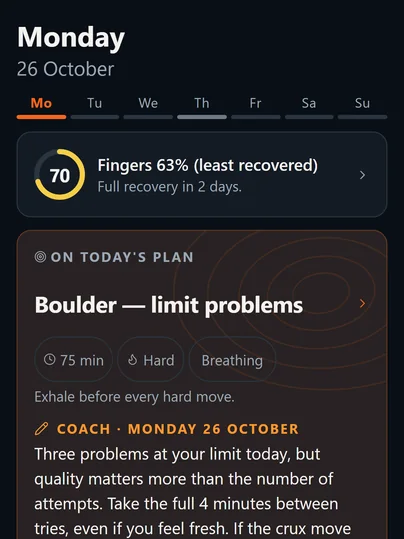
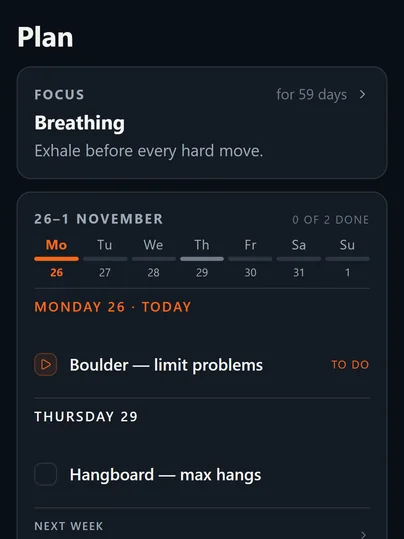
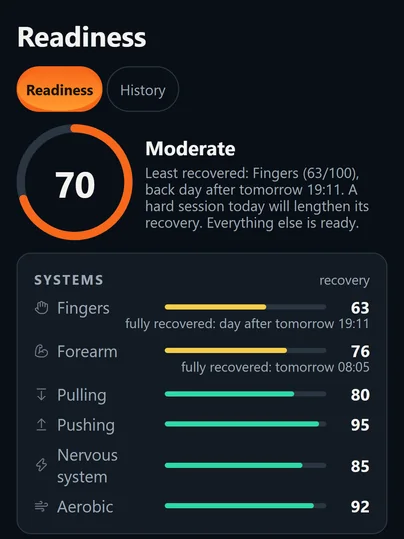
ClimbingDad gives you a week in one of three ways: you plan it yourself, the app lays it out from the days you can train, your equipment and your goal, or your coach plans it. A plan the app builds never puts two finger days back to back. Each day the home screen shows that day’s session. During the session you tick sets as you go, the rest timer starts on its own, and every climb gets a grade and a result: flash, onsight, redpoint, top, fall or attempt. From what you log, the app tracks fatigue in six areas, with fingers on their own, and builds this up over your first two weeks. How that works, and what it does not claim, is in readiness. It works offline, in English and Polish. Best for a climber who wants plan, timers and log in one free app, or who trains with a coach.
Hangboard apps: timers and force sensors
A hangboard app does one of two jobs. A timer counts hangs and rests so you can follow a protocol. A force sensor measures how hard you pull, in kilograms, so you can test and compare. Protocols, loads and how often to hang are in hangboard training.
- Timers with workouts: Crimpd has a timer built for hangboarding and interval circuits. Grippy, made by Griptonite with Beastmaker, offers fingerboard workouts from a network of coaches and is free on the App Store.
- Force measurement: the Tindeq Progressor is a Bluetooth dynamometer for real-time force data, used with a free app on iOS and Android. Grippy has benchmarking and a freehang mode for the Griptonite Motherboard, a hangboard that measures force.
- Timer inside a full plan: in ClimbingDad a hangboard row holds sets, reps, hang time, rest between hangs, rest between sets, added load in kg and the edge in mm. The app times each hang and rest and suggests the next load from your recent sessions of that exercise. It does not connect to a force sensor.
If you want a number for your finger strength, buy a sensor and use its app. If you want to follow a protocol and log the load, a timer app is enough.
Logbooks and guidebooks
These apps are about where and what you climbed, more than how you train. They suit a climber who climbs outdoors or wants a record of every send.
- KAYA has guidebooks with GPS, topos and climb descriptions, beta videos, and gyms that post new sets. Free users get beta videos, ascent and session logging, projects and lists, and the Smart Logbook. KAYA Pro comes in two tiers: Performance adds analytics, a session timer and personalized workouts; Outdoor adds offline maps, the full guidebook catalog and topos.
- Vertical-Life covers gyms, with free gym topos and rankings, and crags, with hundreds of digital guidebooks online and offline. Premium unlocks outdoor content, offline guidebooks, training plans and GPS navigation. Its logbook and profiles are now merged with 8a.nu, so ascents sit in one logbook.
- Griptonite finds and filters climbs at gyms that use it and logs sessions to show your progress. Griptonite Pro adds video movement analysis (Spray) and personalized workouts.
ClimbingDad logs every climb with a grade and a result, but it has no crag or gym route database and no guidebooks. For that, use one of these next to it.
Board apps: Kilter, MoonBoard, Tension and spray walls
Every LED board has its own app with that board’s problems, and the app lights up the holds over Bluetooth. You use the one that matches the board in front of you. How to train on them is in board training.
- Kilter Board: climbs from gyms worldwide, lights over Bluetooth, attempt logging and playlists for circuits. On the App Store and Google Play.
- MoonBoard: pick your board setup, browse thousands of problems, set your own and log ascents. Free, on the App Store and Google Play.
- Tension Board 2: search and climb problems, create your own, keep a logbook and share beta videos. Version 5.0.0 added a workout planner that builds climb lists from your logbook. Free on the App Store.
- Stōkt: for spray walls at the gym or at home. You photograph the wall, the app scans the holds, and you set, share and log problems. LED strips are sold separately.
ClimbingDad has a system board place among its workouts and counts heavy board work as finger load, but it does not hold board problems or light them up. Plan and log the session in a training app; pick the problems in the board’s app.
Where ClimbingDad fits, and where it does not
- A good fit if you want one free app for the week’s plan, the timers and the log, if you want to see which part of you is tired, or if you train with a coach.
- Not the right choice if you want a guidebook or an outdoor tick list (KAYA, Vertical-Life), a board’s problems (that board’s app), or force numbers from a sensor (Tindeq Progressor, Griptonite Motherboard).
- Not the right choice either if you want a ready coach-written plan from a well-known training brand. That is what Lattice sells.
How we compared
We grouped apps by the job a climber opens them for, not by a score. For each app we read its official website or its App Store or Google Play listing on 3 November 2026, and wrote down only what those pages say: features, platforms where they are named, the free tier and the price. Prices are in US dollars, from the US App Store or the app’s own site, and they differ by country. Where a page did not say something, we wrote “not stated” or left it out. We did not use ratings, reviews or download counts. We left out apps whose current official listing we could not read, including the older Beastmaker Training App and theCrag’s app.
Questions climbers ask
Which climbing training apps are best?
It depends on the job. For a library of structured workouts with a free tier, Crimpd. For a coach-written or adaptive plan you pay for, Lattice. For a free weekly plan, timers and a log you fill in while you climb, with or without a coach, ClimbingDad. For outdoor logbooks and guidebooks, KAYA or Vertical-Life. For a board, that board's own app.
Are there free climbing training apps?
Yes. Crimpd has a free tier with over 75 workouts, a training log and analytics. ClimbingDad is free, and you only pay if you train with a coach, at a price the coach sets. The Tindeq Progressor app and the MoonBoard app are free, but they are made for their own hardware.
Which hangboard apps are best?
For a timer with ready workouts, Crimpd or Grippy. To measure how hard you pull, you need a force sensor and its app, such as the Tindeq Progressor or Grippy with a Griptonite Motherboard. ClimbingDad times hangs and rests and logs edge width and added load, but it does not connect to a sensor.
Crimpd or Lattice?
Crimpd is a workout library and timer with a free tier and a paid Crimpd+ that adds more workouts and custom plans. The Lattice app is free to download but needs a Lattice plan subscription: a LatticePlan that adapts as you log, or a coached plan with in-app messaging on the coached tier.
What is the best app for logging climbs outdoors?
An app with a guidebook behind it. KAYA logs ascents and sessions for free and sells guidebooks, offline maps and topos in KAYA Pro. Vertical-Life has gym topos and hundreds of digital guidebooks, and has merged its logbook with 8a.nu. ClimbingDad logs climbs with a grade and a result but has no crag database.
Do I need a separate app for the Kilter Board or MoonBoard?
Yes. Each board has its own app that holds its problems and lights up the holds over Bluetooth: Kilter Board, MoonBoard and Tension Board 2. For spray walls and home walls, Stōkt. A training app such as ClimbingDad can plan and log a board session, but it does not light up problems.
Train and log with a coach
ClimbingDad is a free climbing training app for training on your own or with a coach. A coach plans your week in a web panel and can leave a note on a session, which shows on that day’s card. The coach reads your log, but the coach panel cannot change it; if you train with one, you subscribe to that coach at the price they set. More on training with a coach.
About the author. Mateusz Kuba is a sport climbing instructor (instruktor sportu, sport climbing) with C4PC Level 1 — Strength Training for Youths. He coaches climbers on climbing walls in Warsaw and built ClimbingDad.
Where the details come from
Each app’s details come from its own website or store listing, read on 3 November 2026:
- Crimpd. Features and platforms: crimpd.com. Free tier and Crimpd+: crimpd.com/pricing
- Lattice. App and subscription: latticetraining.com/lattice-app. Features and LatticePlan prices: App Store listing
- Tindeq Progressor. Device, free app, price: tindeq.com/product/progressor
- Grippy. App Store listing
- KAYA. kayaclimb.com, What is KAYA Pro, App Store listing
- Vertical-Life and 8a.nu. App Store listing
- Griptonite. griptonite.io, App Store listing
- Kilter Board. app.kiltergrips.com
- MoonBoard. moonclimbing.com/using-moonboard-app
- Tension Board 2. App Store listing
- Stōkt. App Store listing